
Wilhelm Maritz
Wednesday, October 21, 2026 | 6 min read
My deploy ran my tests, and my tests ran my deploy
Over two days my desktop ran out of memory five times. Four of those times it took my whole terminal window, with herdr, the Hermes agent running in it, and everything else in that window. From where I sat, Hermes kept crashing. It wasn’t Hermes.
Every one followed the same command by a minute and a half to two minutes: a run of one test file in railway-bridge, my exporter for Railway’s metrics. I matched the agent’s log of commands against the system journal, and nothing else ran in that window.
Two sensible files
The first half is in the public repo. deploy.sh runs the test suite before it deploys anything, so a deploy can’t ship code that fails its own tests. Line 35:
python3 -m unittest discover -s "$here/tests" -q
The second half came on 19 October. A subagent, working on the move to a new server, wrote tests/test_deployment.py. Its tests run deploy.sh with fake ssh, scp and docker on the path, to check what the script would do to the remote host without touching it.
Both are good practice. A deploy that refuses to ship failing code is good. A deploy script with tests is better than one without. Neither file was wrong on its own.
Together they were a loop. A test run started deploy.sh. deploy.sh started the test discovery. Discovery found the deploy tests again, which started another deploy.sh, and so on, with nothing to stop it. It never reached the network: the tests run on line 35 and the first ssh is on line 63, so every level started the next one before it got that far.
A deployment test must not re-enter the suite that invoked it.
I called it a fork bomb, and it wasn’t
My first read was an exponential fork bomb. Before writing anything down I reproduced it inside a cap: the committed repo copied to scratch, the test file put back exactly as the subagent left it, fake ssh and scp that only logged, and one test run in a systemd unit limited to 300 tasks, 1,500 MiB of memory and no swap.
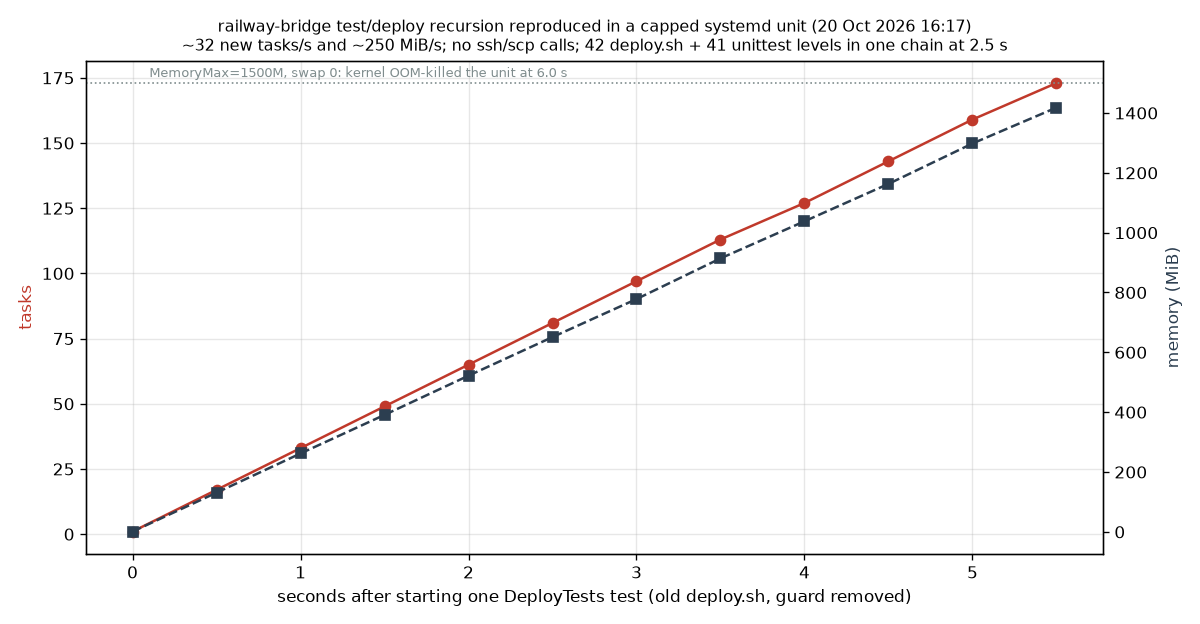
It grew in a straight line, about 32 tasks and 250 MiB a second, and the kernel killed it at 6.0 seconds. At 2.5 seconds there was one chain, 42 deploy.sh levels deep, each process with exactly one child. Linear, not exponential. The fake ssh log was never created, so nothing tried to leave the machine.
Linear was still plenty. At about 16 MiB a level, one chain fills 30 GiB of RAM in around two minutes, which is the delay the journal showed before every crash.
Why it took the whole window
systemd-oomd, the userspace out-of-memory killer my desktop runs, doesn’t kill a process. It kills a cgroup, and every terminal window was its own cgroup. When swap passed about 59 of 61 GiB, it killed the window with the most swap in it. The journal counted 18,705 processes killed the first time and 29,082 the worst. herdr, Hermes, the runaway tests and any other pane in that window all went together.
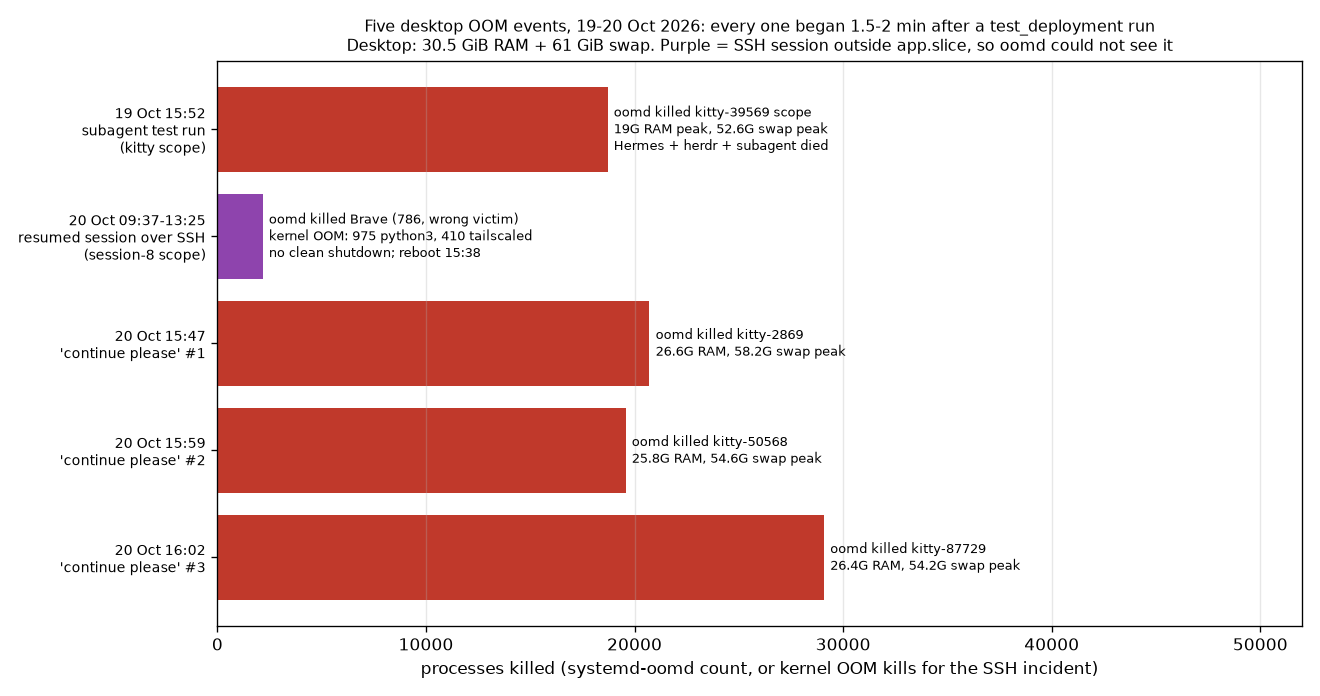
The worst one was the SSH session. One morning I resumed the work from my laptop over SSH, and that shell lived outside the part of the system oomd watches. oomd killed the only thing it could see with swap, my browser, which wasn’t the cause. The growth carried on. Over almost four hours the kernel’s own OOM killer fired 1,392 times. 410 of those kills were tailscaled, which systemd kept restarting, and Tailscale was how my laptop was reaching the desktop in the first place. The machine was killing the connection I’d have used to stop it.
That afternoon I made it worse three more times. Each time I asked the session to carry on, its first check was to run the test suite.
What changed
- The deploy tests refuse to recurse, two independent ways. Before any of them runs, they fail if
deploy.shstill contains aunittestcall, or if an environment variable that every test-starteddeploy.shsets is already present. Against the old script, all three failed in half a second with “refusing to run it recursively”. deploy.shno longer runs the tests itself. Tests run before a deploy, as a separate step. That change is on my machine and not in the public repo yet, so the publicdeploy.shstill has the line above. It’s harmless as committed, because no committed test runs the deploy, but anyone who adds one will meet this loop.- Every terminal window now has a cap, through a systemd drop-in that limits each window’s scope to 1,024 tasks. I proved it with the unguarded test: the count stopped at exactly 1,024, forks failed inside that window, and the rest of the desktop carried on.
What generalises
Three things, and the first is the one I’d have got wrong.
A timeout didn’t clean up the tree, and a cap isn’t cleanup either. Python’s
subprocess.runtimeout killed the shell I started, but in my reproduction that shell’s backgroundsleepsurvived, so I couldn’t rely on that timeout to clean up whatever it had started.A systemd cap is a different protection, and it doesn’t do cleanup on its own:
TasksMaxonly stops new tasks being created, andMemoryMaxtriggers an out-of-memory kill inside the unit. When I proved the window cap, the runner’s own timeout still left 42 processes behind inside it, and only stopping the unit removed them. So I now run test suites insidesystemd-run --user --scope -p TasksMax=200 -p MemoryMax=2Gwith a timeout, and stop the unit when it’s done.One difference I haven’t closed: the reproduction ran with no swap, and that command doesn’t set
MemorySwapMax, so on my machine a runaway inside it can still spill into swap beforeMemoryMaxstops it. AddingMemorySwapMax=0is the obvious next step, and I haven’t tested that recipe yet.Out-of-memory protection works on groups, and it only protects what it can see. oomd took out whole windows because a window was the group. Over SSH it saw nothing, and the kernel’s last resort picked victims one at a time, including the network.
A subagent’s test is unreviewed code until someone reads it. It wrote the test and ran it in the same minute. When I came back to the work, I read its file list and transcript, but not the new test against
deploy.sh, so the next session started the loop again.I treated “run the tests” as the safe part of the work, but the agent had just changed what that command would run. One short chain would have shown it: the test starts
deploy.sh,deploy.shstarts discovery, and discovery finds the same test. The transcript told me what the agent had tried. Reading those calls together would have told me what the next run would actually do.That’s the review I missed: not whether the agent had added tests, but what those tests could start, and what would stop them.
If your deploy runs your tests, check what your tests run.