
Wilhelm Maritz
Wednesday, July 22, 2026 | 6 min read
My folder locker never locked anything
In February 2025 I wrote a folder locker: a Windows batch script with a password prompt, a folder that vanishes from Explorer, and a README describing it as secure. The password was sitting in the script in plain text. The files were never encrypted. What the script actually did was rename a directory, and it took me three versions across seventeen months before the documentation said so plainly.
The entire lock
Here is the mechanism, in full:
ren Locker "Control Panel.{21EC2020-3AEA-1069-A2DD-08002B30309D}"
attrib +h +s "Control Panel.{21EC2020-3AEA-1069-A2DD-08002B30309D}"
A rename and two file attributes. That string is the CLSID of the classic Control Panel, and the trick has circulated on the internet for as long as I can remember. I did not invent it, I adopted it, which is worth saying because the adoption is the part I got wrong rather than the code.
Before locking, a folder with three files in it:
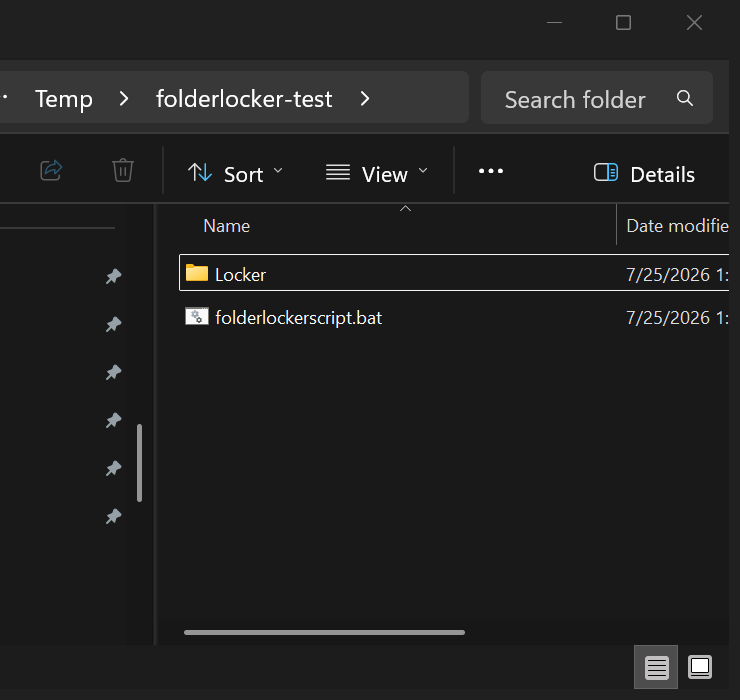
After running the script and answering Y, Explorer shows one item:
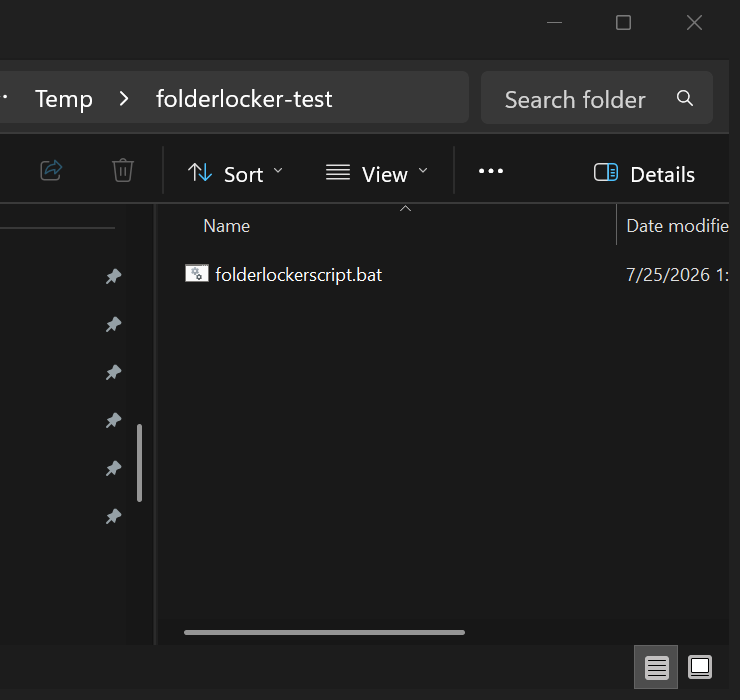
That looks like something happened. Here is the same directory from a command prompt, thirty seconds later, with no password entered at any point:
C:\folderlocker-test>dir /b
folderlockerscript.bat

C:\folderlocker-test>dir /a /b
Control Panel.{21EC2020-3AEA-1069-A2DD-08002B30309D}
folderlockerscript.bat

C:\folderlocker-test>type "Control Panel.{21EC2020-3AEA-1069-A2DD-08002B30309D}\notes.txt"
Sourdough starter, day 4.
Fed 50g flour, 50g water at 0800.
dir /a finds it, type reads it. The password prompt guards the script’s own menu, not the data, and the data was never touched.
The disguise does not hold up either. On Windows 11, opening that folder gives you an address bar that says Control Panel above a listing of your files:
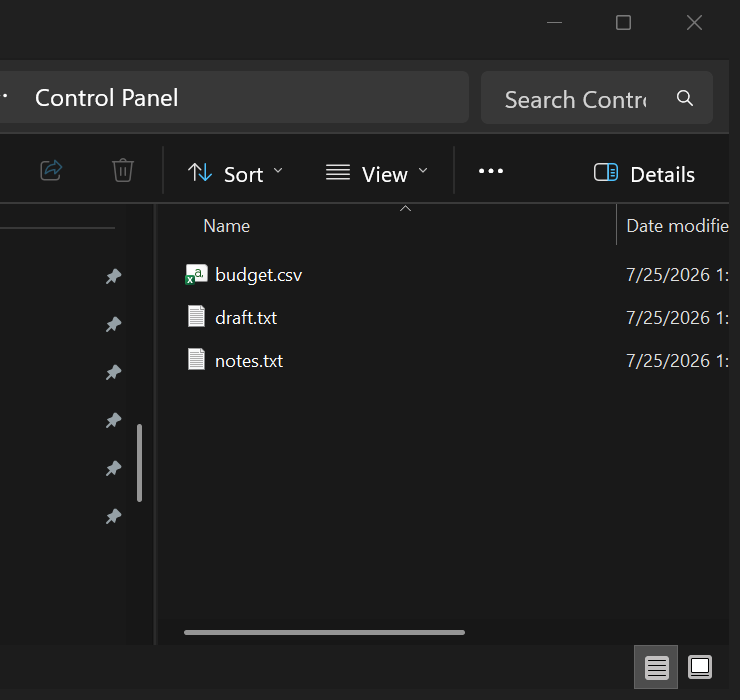
Windows honours the CLSID enough to relabel the breadcrumb and not enough to hide anything.
The password that was not a password
Version one checked the password like this:
if NOT %pass%==PASSWORD goto FAIL
The password is the literal string PASSWORD, in the file, readable by anyone who opens the script they are being protected from. Changing it meant editing that line, which the README explained as a customisation step.
The comparison is unquoted, so it also breaks on input it did not expect. Pressing enter at the prompt gives:
Enter password to Unlock folder
>goto was unexpected at this time.
An empty variable turns the line into if NOT ==PASSWORD goto FAIL, which is not valid, and the script dies. I had assumed for a while that this fell through into the unlock branch, which would have made it a bypass. It does not; it just crashes. The bypass never needed the script anyway, since renaming the folder back is a single command.
Version two, the next day
The rewrite landed on 1 March 2025 and it fixed real things. Every comparison became quoted, empty input was rejected explicitly, the menu gained a status line and a confirmation step, each operation verified its own result afterwards, and the password moved out of the source into a hidden .config.dat file beside the script. There is a neat six-character minimum built out of nothing but substring expansion:
IF "%pass1:~5%"=="" (
    ECHO Password is too short. Please use at least 6 characters.
)
But the password was still stored like this:
:: Store password with simple encoding - better than the original
ECHO !pass1!>"%PASSWORDFILE%"
There is no encoding on that line. It writes the password, as typed, into a file whose only protection is a hidden attribute. I have written before about a fade that never faded, where a comment described an intention the code did not carry out. Same mistake, eighteen months apart, and this one had a second bug hiding underneath it.
The bug that stayed invisible for seventeen months
The password file gets hidden and system attributes the first time it is written. On Windows, redirecting output to a file that already has those attributes fails:
[attrs]
A  SH                C:\...\t.dat

[now redirect again while hidden+system]
Access is denied.
[errorlevel] 0

[contents]
first
Read that middle block again. The shell prints “Access is denied.”, leaves %ERRORLEVEL% at zero, and the file keeps its old contents. The failure is visible to a human watching the console and invisible to the script.
So in version two, changing your password did nothing. The script verified your current password, took the new one, confirmed it, wrote “Password set successfully” to the screen, and discarded the write. Your old password kept working. Nothing errored, nothing logged, and the one path where a user is actively trying to improve their security is the path that silently refused.
Version 2.2
The current version, from 22 July 2026, fixes the storage and the labelling together. Passwords are stored as a SHA-256 hash computed with the certutil binary that ships with Windows, prompts are masked so nothing is echoed while you type, and files written by older versions are detected and upgraded to a hash the first time the correct password is entered. The attribute dance around the write is now explicit:
CALL :HASHPASS "!pass1!"
ATTRIB -H -S "%PASSWORDFILE%" >NUL 2>&1
>"%PASSWORDFILE%" ECHO !HASHPASS_OUT!
ATTRIB +H +S "%PASSWORDFILE%" >NUL 2>&1
The word “Secure” came off the name in the same commit. The script now says what it is in its own header, before you touch anything:
========================================
           FOLDER LOCKER v2.2
========================================
 Hides a folder from casual view.
 This is not encryption or security.
========================================
And the README opens with it rather than burying it in a closing note: “This is a privacy trick, not security. It hides a folder from casual view; it does not encrypt anything, and anyone who knows how to show hidden files can open it without the password.”
What I would do differently
Not much about the mechanism, which is a fine piece of fun with built-in tools and does exactly what a rename and two attributes can do. The thing I would change is the order I did it in. Version one shipped a claim it could not support, and every later version was walking that claim back toward the truth.
If files need protecting, encrypt them: a VeraCrypt volume or a 7-Zip archive with AES, both of which stay shut while the machine is running and someone else is sitting at it. BitLocker is worth having and does not do this job - it protects the disk at rest, which defends a lost or stolen laptop, not a folder on a machine that is unlocked and logged in. If you only want them out of sight on a shared machine, that is a real and useful thing to want, and the honest word for it is hidden. A tool that says “hidden” and hides is finished software. A tool that says “secure” and hides is a bug you cannot fix in code.
Code: B3ardBr0/folder-locker. The CLSID trick is not mine, it has been passed around the internet for years; the versions, the bugs and the walk back to an accurate README are.