
Wilhelm Maritz
Friday, August 28, 2026 | 7 min read
The 144 Hz monitor that preferred 60
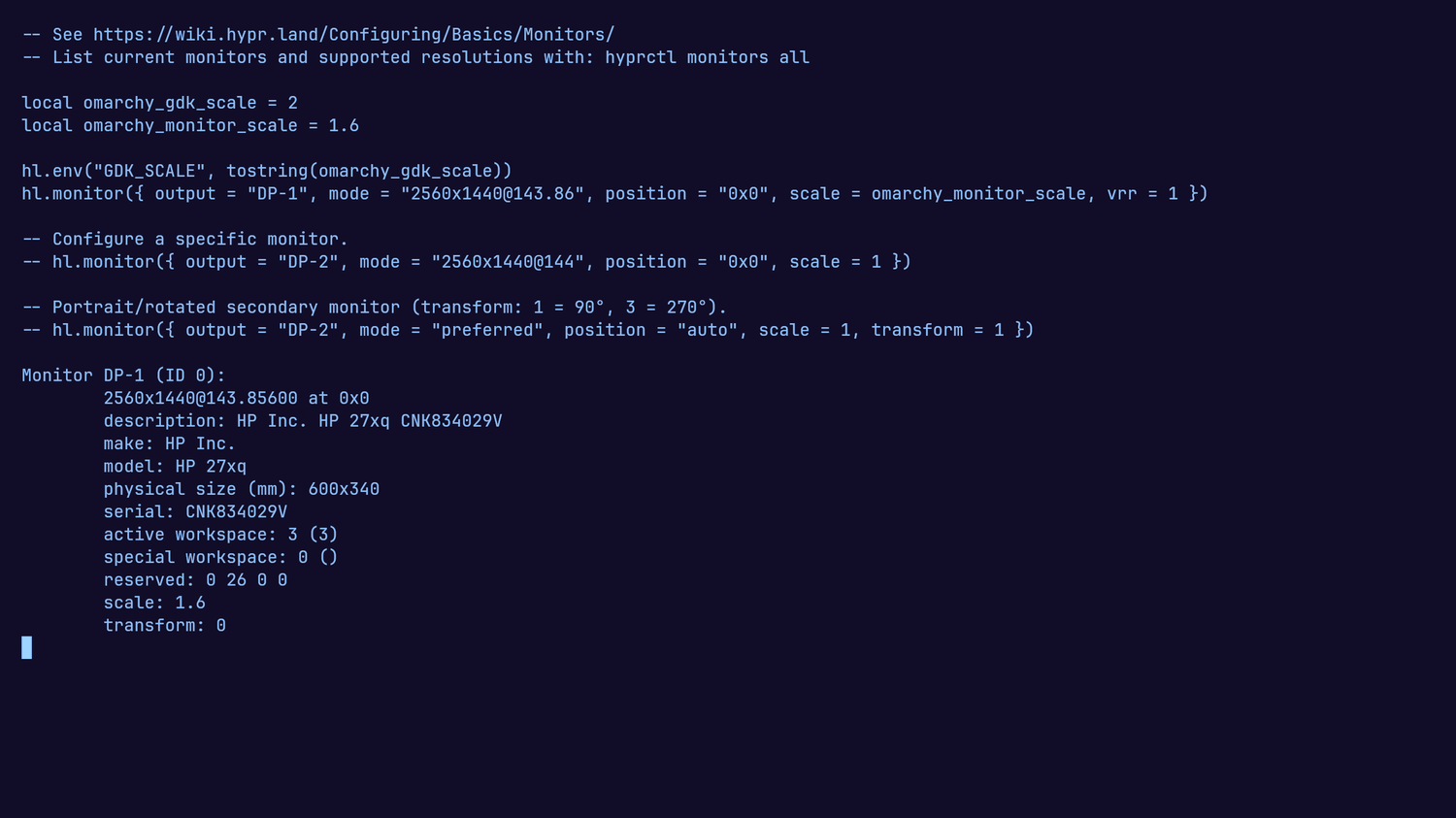
hyprctl monitors said [email protected]. hyprctl monitors all listed 143.86Hz, 119.88Hz and 69.92Hz as available on the same output. An HP 27xq on DisplayPort, a 144 Hz panel, running at 60 because that is what it had been asked for. This is the trap I owed a post to when I wrote about where the distro hopping stopped; it turned out to have two more acts.
Here is the line that asked for it, as Omarchy shipped it in ~/.config/hypr/monitors.lua:
hl.monitor({ output = "", mode = "preferred", position = "auto", scale = omarchy_monitor_scale })
Nothing there is misconfigured. It is configured to defer, and the panel gave a conservative answer.
“Preferred” is an EDID term, not a superlative. It is the timing the display nominates as its default in the base EDID block, and plenty of monitors nominate 60 Hz while supporting far more. Hyprland was honouring the panel exactly as asked. The word reads like “best available” and means “whatever this display puts forward”, and those are the same thing often enough that the gap is easy to miss.
Two commands separate them:
hyprctl monitors          # what you are running
hyprctl monitors all      # every mode the display supports
If the second list holds something better than the first, name the mode:
hl.monitor({ output = "DP-1", mode = "[email protected]", position = "0x0", scale = omarchy_monitor_scale, vrr = 1 })
hyprctl reload, hyprctl configerrors clean, and hyprctl monitors reported [email protected].
The same 60 Hz, three days later, for a different reason
I put an RX 6800 in the machine. The desktop came up looking correct, which is exactly the problem: the panel was back at [email protected].
The config above was still there and still right. A new card renames the outputs. The integrated Radeon presented the monitor as DP-1; the RX 6800 presents it as DP-3. A monitor rule that names an output which no longer exists matches nothing, and Hyprland doesn’t consider that worth mentioning. hyprctl configerrors was clean, because the config has no error in it. It refers to a thing that isn’t there, which isn’t the same as being malformed.
The second time cost more than the first, despite being the same symptom on the same panel, because the first fix was sitting in the file looking correct.
After any hardware change, re-read the output names before trusting a rule that hardcodes one. hyprctl monitors prints them.
Two absences that agreed with each other
The vrr = 1 in that config line did nothing for three days, and working out why is where I got it wrong twice.
My first conclusion was that the 27xq had no adaptive sync at all, because I could find no FreeSync block in its CTA-861 extension. My day-one note disagreed, recording an AMD vendor OUI as present, and the two claims sat unreconciled until I re-read the EDID while writing this post. The re-read settled it: there is no vendor-specific block of any kind, and the 48-144 Hz the note cited is real but lives in the standard Display Range Limits descriptor in Block 0. The note had recorded true numbers at a wrong address, which on its own says something about what a note is worth as evidence.
It also turned out not to matter, because the block I was hunting signals FreeSync over HDMI. Over DisplayPort the mechanism is VESA Adaptive-Sync, negotiated in DPCD across the AUX channel and not present in the EDID at all. On a DisplayPort link the block’s absence is correct behaviour, so nothing the EDID said or omitted could answer the question I was asking it.
I then read /sys/class/drm/card1-DP-3/vrr_capable, found no such file, and took it as corroboration. But vrr_capable is a DRM connector property and sysfs doesn’t expose it, so that was a second piece of non-evidence stacked on the first. Two absences agreeing with each other felt like confirmation and was not.
What I had actually established at that point was nothing. Neither observation was false; neither bore on the question, and two observations that do not bear on a question do not start bearing on it by pointing the same way.
Reading the property properly took a small ctypes shim against libdrm, because modetest opens card0 regardless and ignores both a device path and -D pci:0000:03:00.0. It reported vrr_capable=NO on the connected DisplayPort-3.
Which is what the compositor had been saying in plain English the entire time. aquamarine logs No Adaptive sync support for output on every start. The log had the answer before I began and I read past it, because it names the symptom and I was hunting a cause.
The gate was one bit, and the switch was in the monitor
For DisplayPort, amdgpu_dm_update_freesync_caps requires the sink to assert MSA_TIMING_PAR_IGNORED, bit 6 of DPCD 0x007, which is the display declaring that it can ignore the MSA timing parameters. Reading the AUX device directly returned 0x80. Bit 6 was 0.
Everything I had been treating as the evidence was fine all along. The EDID feature byte says Display supports continuous frequencies and the range descriptor reads 48-144 Hz, which is exactly this panel’s FreeSync window. DFP_COUNT = 0, so there was no adapter or branch device in the path to suspect either. The display was advertising the capability honestly in the place I was looking, and withholding it in the place that counts.
The fix was in the monitor, and the setting is not called FreeSync. It lives under Viewing Modes as a display mode named Gaming-FreeSync. Setting DisplayPort Mode to 1.2 does nothing on its own, which cost a round trip to establish, and was never the constraint anyway: FreeSync runs over 1.2a and reports the same 0x12 DPCD revision either way.
After the mode change the byte read 0xc0, the kernel re-detected the connector and reported vrr_capable=YES, and aquamarine moved from crtc is incapable of vrr to crtc is capable of vrr. The vrr = 1 line that had been inert in monitors.lua for three days started working with no config change at all.
Then I went back through my notes and found the ending already written. The day-one entry closes the VRR question with: most likely the monitor’s own OSD, which ships with FreeSync off by default - plausible, not proven, have not been at the menu to check. The next morning’s task list says, enable FreeSync in the monitor’s OSD, then re-check. The probable cause and the fix were sitting in my own notes for three days while I re-derived both from a DPCD dump, and I have already written a whole post about lessons that do not survive being written down.
The same note got one thing right in a way that held: it kept vrr = 1 in the config, on the grounds that the line was inert until the link said otherwise and would start working the moment it did. That is exactly what happened.
Nothing warned, because nothing was wrong
Three failures, three mechanisms, one shape.
- The stock mode line deferred to the display, and the display answered conservatively.
hyprctl configerrors: clean. - The renamed output made a correct rule match nothing.
hyprctl configerrors: clean. - The VRR gate sat in a byte on the AUX channel that no configuration file can reach.
hyprctl configerrors: clean.
Not one of them produced a warning, because none of them is an error. A deferred setting, a rule matching nothing, and a capability the hardware declines are all legal states. The system was doing what it was told in every case, and what it was told was not what I believed.
I had written the first one up the day it happened, in some detail, and three days later the same panel was at 60 Hz again anyway. A written lesson is not a mechanism. The note told me what preferred meant; it couldn’t tell me the output had been renamed. This site taught me the same thing from the other direction, when a Hugo build had its version pinned correctly in three separate files, none of which the builder reads. The setting that decides is rarely the setting you are reading.
So when something is quietly wrong and every check you can think of comes back clean, the question is not what is broken. Nothing is broken. The question is which layer actually decides, and whether you have read that one yet, or only the one that was easiest to read.