
Wilhelm Maritz
Friday, July 31, 2026 | 7 min read
OneDrive and git fought over my vault. Both lost.
Over two days my Obsidian vault appeared to delete itself, git recorded 146 file deletions that never happened, and OneDrive spawned 120 conflict copies of notes I had just restored. Not one byte of a note was lost. Every failure traces back to a single sentence: two sync systems each believed they owned the same tree, and each interpreted the other’s behaviour as changes to sync.
I have written this shape of post before. RAID1 saved my data but not the state around it, and a trap I had published a warning about caught my own app the same day. This one belongs to both families: the data was never in danger, the state lied about it, and the limit that made it all worse was documented in a workbook I had read and dismissed as something that happens to other people.
How the tree got two owners
Nobody decides to run two sync systems on one folder. You add the second one and never evict the first.
When I started the vault in late 2024 I put it inside OneDrive, because I was new to Obsidian, I had not read anything about backup strategy, and cloud sync felt like backup with zero effort. For what I knew at the time, a defensible choice. Two months later I set up git for proper versioned backup, and that was the moment the vault should have moved out of OneDrive. It did not, because everything appeared to work, and moving a working thing is effort with no visible payoff.
That non-decision held for nineteen months. Each system quietly interpreted the other’s writes as changes to sync the whole time, and mostly got away with it. The two days below are what “mostly” was hiding.
The vault “disappears”
Mid-audit, two directory listings of the same folder, minutes apart. The first showed ten top-level folders and 793 notes. The second:
--- vault root ---
.git, .obsidian
--- .git contents ---
objects
--- .obsidian contents ---
workspace.json
--- Recycle Bin at that moment (excerpt) ---
HEAD, b2, 87, 30-39 Work Administration, ...
The Recycle Bin filling up with git internals is the detail that made it look like a catastrophe. A .git with 5,424 loose objects but no HEAD and no refs is not a repository as far as git is concerned, so even git status failed with not a git repository.
Minutes later the tree came back on its own. This was OneDrive dehydrating files to free disk space and then re-syncing them, which is a feature. From the outside it is indistinguishable from a deletion in progress.
146 deletions that never happened
Once the repository was readable again, git was certain the journal was gone:
## main...origin/main
D  .space/waypoints.json
D  "31 Daily Notes/31.01 Journal/.../5. May/20260503.md"
D  "31 Daily Notes/31.01 Journal/.../7. July/20260701.md"
... (146 deletions in total)

on disk: False
in HEAD commit: YES
OneDrive had dehydrated the files at the moment something staged all changes, so git recorded absence as deletion. The files were in the last commit the whole time. git pull could not help, because the remote was never behind; the fix was one command, git checkout HEAD -- <folders>, and all 146 came back instantly.
Locate the data before restoring it. The instinct under pressure is to pull, because pulling is the restore button in your fingers. But nothing was missing from the remote. The missing files were sitting in HEAD on the same machine.
The near miss that matters more than the incident
Obsidian Git’s auto-commit was switched off at the time. That is the whole story, and it deserves its own paragraph.
Had the usual 10-minute commit-and-push been running, it would have committed those 146 phantom deletions as a real change, pushed them to GitHub, and my Linux machine would have pulled the deletion onto the only other full copy. The backup system would have been the mechanism that propagated the damage to every replica I own. Nothing about the automation would have looked wrong in its logs: clean commit, clean push, clean pull.
Any auto-commit running against a cloud-synced folder will eventually do this. Dehydrated files look exactly like deleted files to git, and automation cannot tell the difference, because on disk there is none.
120 conflict copies, 106 bytes apart
The restore started a second fight. OneDrive was still syncing its own view of the files git had just rewritten, and it did what it does with two writers: kept both.
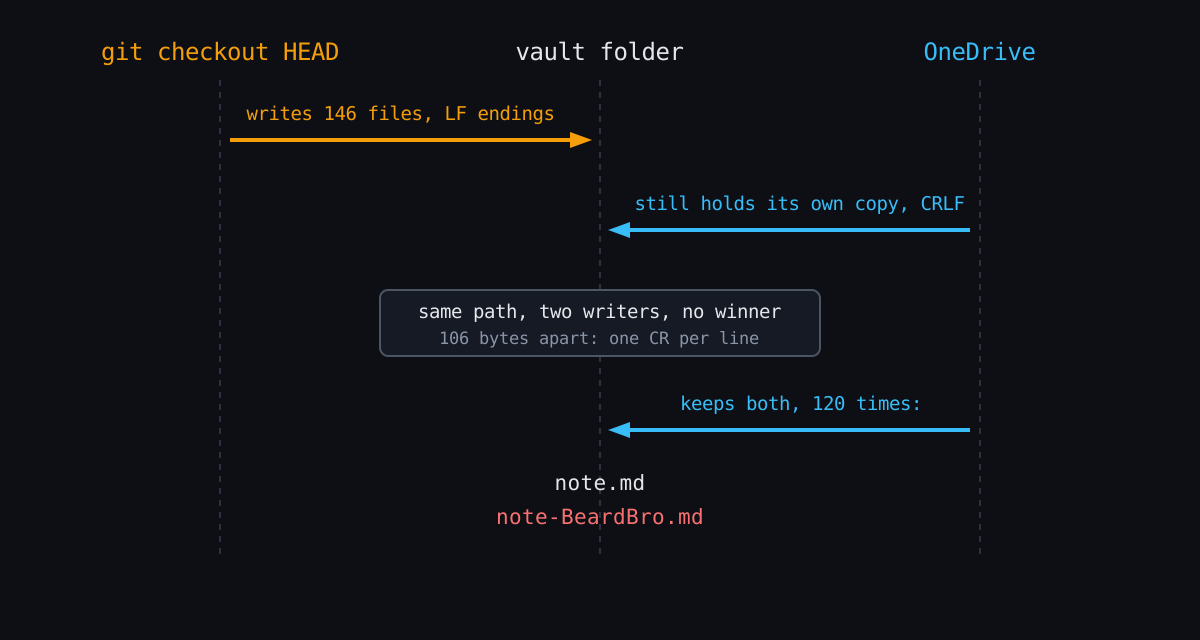
Suddenly there were 120 -BeardBro conflict copies beside the originals. Hashing every pair turned panic into arithmetic:
identical to original          : 0
DIFFERENT from original        : 120     <- alarming until...
identical ignoring line endings: 119
GENUINELY DIFFERENT            : 1       (workspace UI state, gitignored)
Every “different” file was the same note with different line endings. The first bytes of one pair:
conflict copy (OneDrive kept):  2d2d 2d0d 0a64 6174 653a ...   ---..date:   (CRLF: 0d 0a)
git-restored original:          2d2d 2d0a 6461 7465 3a20 ...   ---.date:    (LF: 0a)
One copy of the file was 106 bytes bigger, and it had exactly 106 lines. core.autocrlf=true meant git stored LF and wrote CRLF on checkout, so restoring inside a still-syncing OneDrive folder guaranteed a fork of every file. All 120 copies were verified and then recycled, and the vault’s .gitattributes now says * -text: bytes identical on Windows and Linux, no conversion, ever. Line-ending normalization solves a problem a notes vault does not have, and it donated an entire class of bug in exchange.
The limit I had already read about
While auditing the wreckage I measured path lengths. Windows limits a classic path to 260 characters. The Johnny Decimal workbook, which this vault’s structure comes from, warns about exactly this, and I had read the warning before the vault was ever built.
316  C:\Users\...\OneDrive\20-29 Research and Development\21 Locutus of Borg\
     20-29 Research and Development\...\<an academic article title as a filename>.md
316 characters. 56 over the limit, and it was not alone, which explains why some tools had been failing intermittently on parts of the vault for months. The budget went like this:
| Component | Characters |
|---|---|
| OneDrive user-folder prefix | 24 |
| Johnny Decimal area on the drive | 31 |
| Vault folder name | 19 |
| A second full JD tree inside the vault, plus deep subfolders | ~100 |
| A descriptive filename | ~140 |
Two stacked Johnny Decimal hierarchies, one on the drive and one inside the vault, spent 73 characters before a single note name was written. JD’s descriptive naming is the right system, and it multiplies path length, which is precisely why its own workbook carries the warning.
The fix
The vault now lives at C:\Vault\Borg. Thirteen characters of root instead of seventy-three, the worst path back under the limit, and OneDrive out of the loop entirely: git is the only thing that syncs it, to GitHub and from there to the Linux machine. The 10-minute auto-commit is back on, safe now that nothing else rewrites the tree underneath it. A shortcut sits in the old OneDrive location for my own muscle memory.
Before any of the surgery: a snapshot commit, pushed. The note count (793, then 794 with the next daily note) was checked after every step, a cheap invariant that proved each one lossless. And everything deleted during recovery went to the Recycle Bin rather than into the void, which was the undo button twice in two days.
What I keep
One tree, one owner. Never let a cloud-sync folder and a git repository manage the same files; each one reads the other’s behaviour as changes to sync, and both are right. And the overlap will not announce itself: mine arrived as two individually reasonable choices two months apart, and stayed nineteen months because nothing forced the third choice that was actually needed.
A limit you have read about is still a limit. The MAX_PATH warning was in the workbook, in a section I had read, filed under things that happen to other people. It was already biting my tooling before the incident made it visible.
And the one I find genuinely unsettling: the incident did no damage, but the backup automation would have. The safest moment in the whole two days was the accident of having auto-commit switched off. Backups that run on their own are only as trustworthy as the filesystem they watch, and a cloud-synced filesystem lies.