Wilhelm Maritz
Sunday, September 27, 2026 | 5 min read
The folder on the RAID that wasn't
I went looking for what was slowly filling the NVMe in my ZimaBoard, and found something that mattered far more than the growth rate. The entire Immich photo library, 2,774 photos and 37 videos, was on that NVMe. One drive, no mirror. Beside it sat AnchorPoint, a RAID1 pair of 4 TB disks I’d built specifically to protect data, and none of the photos were on it.
readlink -f /DATA/Gallery # /media/Dockyard/Gallery, the NVMe
Nothing was misconfigured. The Immich app from the ZimaOS store keeps its library at /DATA/Gallery/immich, and ZimaOS keeps its own partition small (17 GB, as I found out updating it by hand) by symlinking the bulky folders under /DATA, AppData and Gallery among them, out to the NVMe. Immich was writing through that symlink onto the unmirrored drive, and I’d never pointed it at the array.
What stung was my own notes. For two days I’d been writing “app data has no mirror, which is acceptable because it is rebuildable”. That’s true of Prometheus history and an uptime monitor’s database. It isn’t true of original photographs.
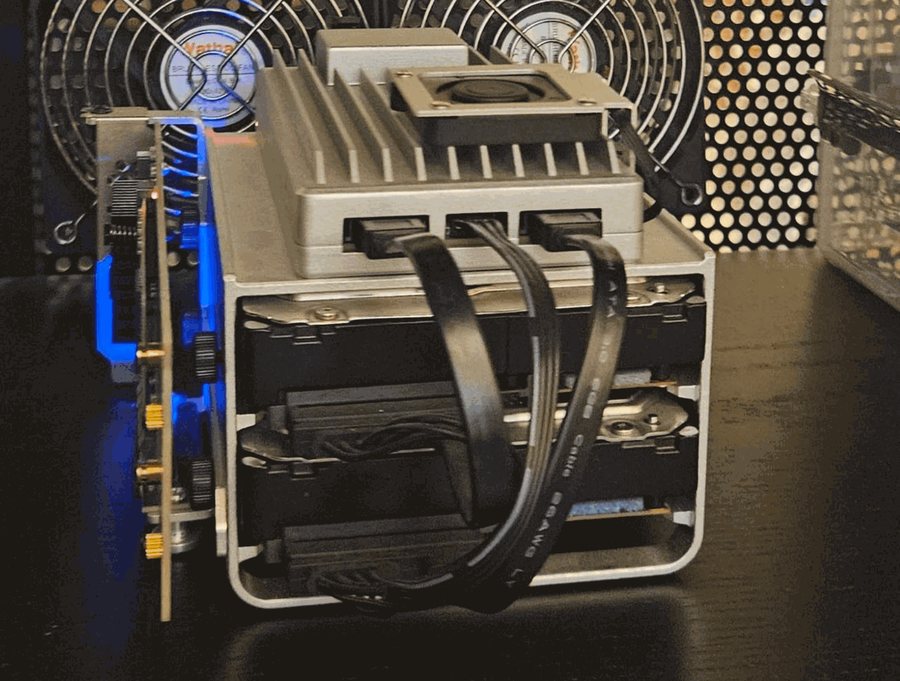 The two hard drives in the cage are the RAID1 mirror. The card standing on its side carries the NVMe, where the photos actually were.
The obvious destination was the source
The fix looked like one copy. And the destination practically named itself: /media/AnchorPoint/Gallery/immich already existed, 25 GB, with a backups folder modified at 03:00 that morning. It looked like an old library from before January’s rebuild of this array, or a backup I’d forgotten about.
It was neither. Two commands, one per question:
df /media/AnchorPoint/Gallery/immich   # /dev/nvme0n1, not /dev/md0
ls -ld /media/AnchorPoint/Gallery      # -> /media/Dockyard/Gallery, dated 14 January
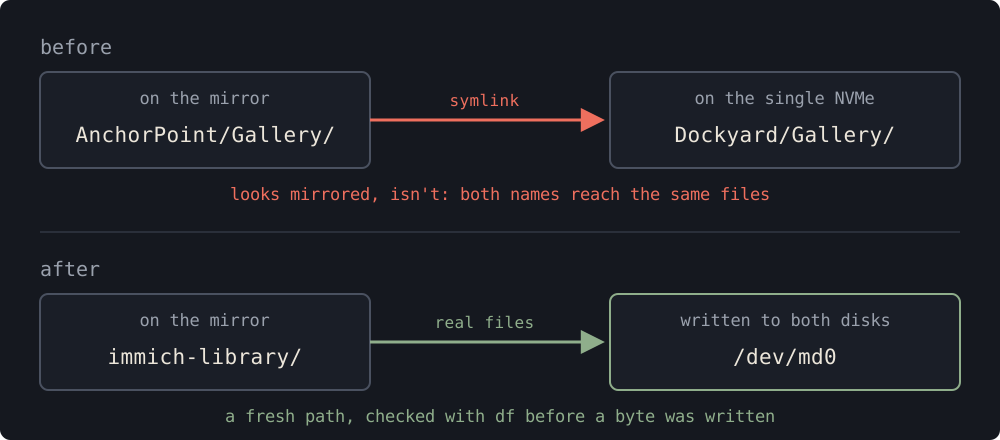
The January migration had left a symlink on the array pointing back at the NVMe. The folder that looked like the mirrored copy of my photos was my photos, on the same single drive, reached by a second name. The backups folder modified that morning was Immich’s own nightly database dump, landing where it always had.
A folder that appears to be on the RAID and isn’t is worse than one that’s plainly somewhere else. A path on the wrong drive that says so gets fixed. A path on the wrong drive that says the opposite gets trusted.
One guard, and the one I should have had
The copy had a single guard: refuse to run if the destination already exists. It wasn’t there for this. Two days earlier I’d learned that cp -a into an existing folder nests the source inside it, and the guard was there to stop that happening again.
It stopped the attempt before I’d discovered that the destination was another name for the source. My notes that day say it saved me from copying the library into itself, which overstates it: cp would most likely have refused on its own, complaining that source and destination were the same file. What it really protected was the check that comes after a copy. A checksum comparison between those two paths would have matched perfectly, because they were the same files on the same disk, and it would have told me nothing about whether I had a second copy.
The second attempt carried the check I should’ve had from the start, which asks the only question that mattered: is the destination actually on the mirror? In outline:
dest=/media/AnchorPoint/immich-library
[ -e "$dest" ] && { echo "refusing: $dest already exists"; exit 1; }
mkdir "$dest"
df "$dest" | grep -q '^/dev/md0' || { echo "refusing: $dest is not on the array"; exit 1; }
A fresh path, and a guard that reads the device instead of the name. I left the misleading symlink where it was, in case ZimaOS relies on it.
The copy that died quietly at 846 files
The first real copy stopped at 846 of 8,629 files and said nothing. du sat at 5.7 GB for minutes, and I’d already called it slow and steady before I had any evidence it was either. pgrep showed no cp running at all. Most likely the browser-based terminal I was using dropped its session and took the copy down with it.
The rerun went detached, with its output and its exit code written to disk, so a closed terminal couldn’t kill it and a failure couldn’t vanish:
sudo nohup sh -c 'cp -a <source>/. <dest>/ > /tmp/copy.log 2>&1; echo EXIT=$? >> /tmp/copy.log' >/dev/null 2>&1 &
EXIT=0, 8,629 of 8,629. Anything that takes ten minutes on this board now gets nohup and a log.
It was thousands of small thumbnails going onto mirrored spinning disks, and I’d been watching the byte count. I needed to watch the file count too.
Then the verification, this time between two genuinely different disks. The SHA-256 of all 8,629 files matched on both sides. Immich reported exactly what it had before, 2,774 photos, 37 videos, 22.90 GiB, and now saw a 3.6 TiB volume instead of the 954 GiB NVMe. And because a checksum only proves the copy matches the source, I pulled three originals back out through Immich’s API: each one’s SHA-1 matched the checksum Immich stored when the photo was first uploaded.
What a mirror doesn’t buy you
The originals, thumbnails, encoded video and Immich’s nightly database dumps are on the mirror now. The live database stays on the NVMe, which is right for speed, with the nightly dump on the array to restore it from.
But I’d be overselling this to stop there. RAID1 survives a dead drive. It doesn’t survive a deleted album, a bad update or a fire, and it keeps both copies in the same box. Everything the phone has uploaded to Immich still exists in exactly one building, and a copy off the board is the part that isn’t done.
If you’re moving data somewhere safe, make the copy prove the destination is safe before it writes a byte. A folder’s name is a claim about where it lives. df is the answer.