
Wilhelm Maritz
Saturday, September 19, 2026 | 3minutes
The Tailscale login that could never finish
zimaboard2 appeared in my tailnet, I approved it, and then it sat there: offline, last seen 19m ago.
I wanted the agent box on the ZimaBoard I rebuilt in January reachable from a laptop away from home. Tailscale rather than a forwarded port: it only carries traffic addressed to my own devices, so the rest of the LAN and every machine without it installed are untouched. No exit node, no subnet routing. I installed it on the board as a compose app with host networking, so the tailnet address reaches every port the board already publishes.
It looked like it worked
The container printed a login link. I opened it, approved the node, and the admin console listed it. Every step a person checks had passed. The node was simply never online.
The container’s boot script gives tailscale up 60 seconds, and then kills and restarts itself. A browser login never finishes in that window. So it looped once a minute, and every loop logged Generating a new nodekey, throwing away the identity I had just approved and printing a fresh link for one I hadn’t. The line that names it:
boot: failed to auth tailscale: tailscale up failed: context deadline exceeded
An interactive login cannot succeed inside a container that restarts every sixty seconds, and each restart discards the node you just approved. The link was real every time. It was a link to a node that would be dead before I finished clicking.
The fix, and taking it back out
A single-use auth key in the compose file. It logs in within a second or two, well inside the window, and the loop stops.
Then I took the key back out of the compose and recreated the container. That proved two things at once: no credential is left sitting on the NAS, and the login survives on the state volume alone. It came back online in 25 seconds without the key.
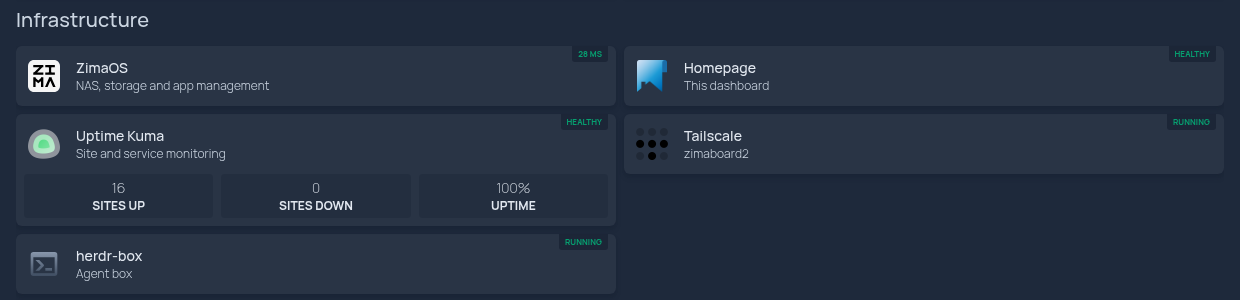
Now the board is on the tailnet with a direct path at 1 ms, the agent box answers SSH across it, and the dashboard reads both containers as running off the Docker socket:
What is still open
Two things, both mine to do.
Tailscale node keys expire after 180 days by default, so unless I disable key expiry for this node in the admin console it will drop off the tailnet in March without telling me.
And the dashboard’s tile links still point at the board’s LAN address. Away from home the dashboard loads and the widgets work, because they fetch server-side, but clicking through to a service does not. That needs tailnet addresses in the links, or subnet routing, and I haven’t chosen.
If you put Tailscale in a container, don’t judge it by the login link. Look again two minutes later, and once more after a restart. And treat the auth key as what it is: use it once, take it out, and restart to prove you never needed to leave it there.